Table of Contents
- What is Virtual Renovation?
- Virtual Renovation vs. Virtual Staging
- Why Virtual Renovation Works for Real Estate
- What Can Be Virtually Renovated?
- Virtual Renovation Pricing
- The Virtual Renovation Process
- When to Use Virtual Renovation
- Best Practices and Transparency
What is Virtual Renovation?
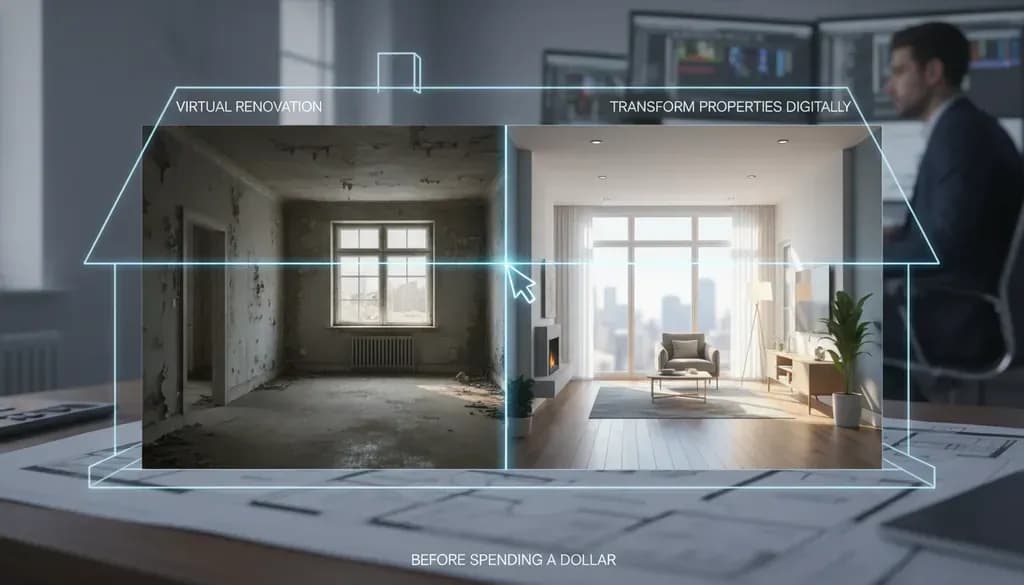
Virtual renovation is a digital process that shows a renovated space using photos or 3D models. It helps homeowners, realtors, and designers preview changes without physical construction.
Unlike virtual staging, which only adds furniture and décor to empty rooms, virtual renovation goes deeper. Virtual renovation involves structural elements and finishes, allowing for modifications to walls, floors, ceilings, and internal distribution. You can digitally replace kitchen cabinets, swap outdated tile, change flooring materials, update countertops, and modernize fixtures—all without a contractor setting foot on the property.
Think of it as Photoshop for renovations, but with architectural precision. Virtual Renovation involves digitally altering an image of either an existing property to showcase what it could look like after it's been remodelled, or a partially-built property to show what it will look like after construction is complete.
[Image: side-by-side comparison showing a dated 1990s kitchen with oak cabinets and laminate counters on the left, and the same kitchen virtually renovated with white shaker cabinets, quartz countertops, and subway tile backsplash on the right]
Virtual Renovation vs. Virtual Staging
Many people confuse these two services, but they serve different purposes:
Virtual Staging adds furniture, art, and accessories to empty rooms. It answers the question: "What would this space look like furnished?"
Virtual Renovation changes permanent fixtures like cabinets, flooring, tile, and finishes. It answers: "What would this property look like after a $30,000 remodel?"
Virtual staging places furniture and decor into photos to show a lived-in space. A virtual remodel goes further and changes fixed elements like cabinets, counters, or built-ins. Both services enhance listing photos and help buyers visualize the potential of a property.
You can combine both services—virtually renovate the kitchen with new cabinets and counters, then virtually stage it with a breakfast table and pendant lights.
Why Virtual Renovation Works for Real Estate
Buyers Struggle to Visualize Potential
You can scroll a dozen listings in a minute. Dated oak cabinets. Brown tile from 1994. A half-finished backyard. Even savvy buyers struggle to visualize potential, which is why virtual renovations for property listings matter right now.
Most buyers scroll past properties that need work, even when they're priced accordingly. They overestimate renovation costs, underestimate the final result, and move on to turnkey homes. Virtual renovation solves this by showing them exactly what's possible.
Cost Comparison: Digital vs. Physical
The math is compelling:
- Physical kitchen renovation: $15,000–$40,000 and 4–8 weeks of work
- Virtual kitchen renovation: $20 to $30 per image and 24–48 hours turnaround
- Physical bathroom remodel: $20,000-$30,000 but may only add $15,000 to the home's value
- Virtual bathroom update: $25–55 per photo
You're not replacing the actual renovation—you're helping buyers see the value before they write an offer. For properties sold as-is or to investors, that visualization can mean the difference between 45 days on market and multiple offers in the first weekend.
Real Results
Virtual staging has shortened home-sale cycles by 87% and lifted prices by 15% according to Interior AI, demonstrating direct ROI for visualization spend. While virtual renovation data is less established, agents report similar results when applied to dated or unfinished properties.
One case: A condo sat 45 days thanks to a pink tile bath. A virtual bathroom remodel with white subway, a floating vanity, and black fixtures reframed the conversation. A buyer offered list after seeing that the footprint worked and the upgrade would be straightforward.
[Image: before/after of a dated pink bathroom virtually renovated to modern white and gray with floating vanity]
What Can Be Virtually Renovated?
Nearly any fixed element of a home can be digitally updated:
Kitchens:
- Cabinet door styles and colors
- Countertop materials (quartz, granite, butcher block)
- Backsplash tile
- Flooring
- Appliances and fixtures
- Lighting
Bathrooms:
- Vanity cabinets and counters
- Tile (floor, shower, accent walls)
- Fixtures (sinks, toilets, tubs, showers)
- Mirrors and lighting
Living Spaces:
- Flooring (hardwood, LVP, tile)
- Wall colors and textures
- Built-in shelving or fireplaces
- Ceiling treatments
Exteriors:
- Siding materials and colors
- Windows and doors
- Roofing
- Landscaping elements
- Decks and patios
Any room inside or outside a home or commercial structure can be virtually remodeled. We mostly remodel kitchens and bathrooms, followed by great rooms and primary bedrooms. We can also virtual remodel outdoor spaces, commercial spaces, pools, pool houses, additions and garages.
Virtual Renovation Pricing
Costs vary based on complexity and provider:
When it comes to specific pricing examples, floor and wall changes typically fall within the more affordable range, ranging from under $5 to $30 per photo.
Typical pricing breakdown:
- Simple updates (paint, flooring): $5–20 per image
- Moderate changes (cabinets, counters, tile): $25–55 per image
- Complex renovations (structural changes, full room remodels): $55–75+ per image
- Rendering from blueprints: closer to $75 per image
Most virtual remodeling, virtual renovation and interior rendering projects take less than a week from start to finish. It depends largely on the size of the spaces being remodeled, and the complexity of the designs.
For comparison, AI-powered virtual staging tools like VirtualStaging.art offer virtual staging from $5 per photo, with virtual renovation services typically priced slightly higher due to the additional complexity of altering permanent fixtures rather than simply adding furniture.
The Virtual Renovation Process
Here's how it works with most professional services:
1. Submit Your Photos
Upload high-resolution images of the space. Good lighting and straight angles produce the best results. Most services accept JPEG or PNG files.
2. Specify Your Vision
Describe what you want changed. Be specific: "Replace oak cabinets with white shaker style, swap laminate counters for white quartz, add subway tile backsplash, replace vinyl floor with gray LVP."
Some services let you upload inspiration images or Pinterest boards. The more detail you provide, the more accurate the result.
3. Designer Creates the Render
Professional editors use a combination of 3D modeling, photo editing, and increasingly, AI-powered tools to transform your image. Thanks to 3D rendering, augmented/virtual reality, and especially artificial intelligence, it is now possible to transform floor plans, photos, and BIM models into photorealistic, customized, and immediately usable environments. Solutions like the AI architecture generators allow for faster design, improved communication with clients, and increased perceived value of properties, simplifying decision-making processes and reducing presentation times and costs.
4. Review and Revise
Most services include one or two rounds of revisions. You can request adjustments to colors, materials, or layout details.
5. Receive Final Images
Typically within 24–72 hours, you'll get high-resolution images ready for MLS listings, social media, or client presentations.
[Image: workflow diagram showing the 5 steps from photo upload to final delivery]
When to Use Virtual Renovation
Virtual renovation makes the most sense in these scenarios:
Dated Properties That Photograph Poorly
Selling older homes that haven't seen updates in a while can be quite a challenge when it comes to presenting them in an enticing way. No matter how hard you try, these homes just don't seem to photograph well, which can lead to a lack of buyer interest. As a consequence, the home may end up languishing on the market for far too long, simply because you haven't discovered the magic formula to sell them.
A 1980s home with popcorn ceilings, brass fixtures, and floral wallpaper will sit on Zillow. Virtually update it to show neutral paint, modern fixtures, and clean finishes, and you give buyers permission to see past the cosmetics.
Investor and Flip Properties
Show the ARV (after-repair value) before the investor even makes an offer. A small investor used digital renovation previews on a duplex acquisition memo. Side-by-side images showed bath retiling, vanity swap, and lighting for under a set budget. The lender greenlit the ARV assumptions faster, and the investor won the bid by demonstrating a clear plan.
New Construction or Unfinished Projects
Property developers should also be mindful of this important consideration: new construction buyers are the most inclined to make offers without physically viewing the property, with 67% expressing at least some level of confidence in doing so.
When walls are up but finishes aren't installed, virtual renovation shows buyers what they're actually buying. It bridges the gap between studs and sheetrock.
Pre-Listing Seller Consultations
When a seller asks, "Should I renovate the bathroom before listing?" you can show them two scenarios: the current state and a virtually renovated version. They can see whether a $15,000 investment will meaningfully improve marketability, or if virtual renovation for marketing is the smarter play.
Properties in Competitive Markets
According to the Harvard Joint Center for Housing Studies, renovation and repair spending is projected to hit a record $524 billion in early 2026. In markets where buyers expect move-in ready homes, virtual renovation helps dated properties compete without the time and expense of actual construction.
Best Practices and Transparency
Virtual renovation is a powerful marketing tool, but it must be used ethically:
Always Disclose
While Virtual Renovation is a powerful tool for showcasing the potential of a property, it's important to note that not every MLS (Multiple Listing Service) allows the upload of virtually renovated images. Therefore, it's essential to check with your specific MLS guidelines before using these images in your listings. However, virtually renovated images are extremely useful when showing the property in person, as they help potential buyers visualize the space's potential. If you do use these images in any context, we recommend including a clear disclaimer to indicate that certain features have been digitally altered. This approach ensures transparency and helps maintain honest advertising practices.
Label images clearly: "Virtual renovation concept" or "Digitally enhanced to show renovation potential"
Show Current Photos Alongside
Never use only virtually renovated images. Always include the actual current state of the property, following similar disclosure requirements as virtual staging. Pair them side-by-side or in alternating slides so buyers understand exactly what they're getting and what's possible.
Include Cost Estimates
Use clearly labeled virtual renovations and add a caption that the image is a digital renovation concept. Include a note about feasibility, permits, and costs so the remodeling visualization is informative and transparent.
If you show a virtually renovated kitchen, provide a ballpark estimate: "Estimated renovation cost: $25,000–$35,000 for cabinets, counters, backsplash, and flooring."
Use It as a Tool, Not a Trick
The goal is to help buyers visualize potential and make informed offers—not to mislead them into thinking renovations have already been completed.
[Image: example of MLS listing with proper disclaimer text overlay on virtually renovated photo]
Virtual Renovation Software and Services
You have two main options: DIY software or professional services.
DIY Software: Tools like SketchUp, Planner5D, and newer AI apps let you create your own renderings. They're free or low-cost but require time and some design skill. Quality varies significantly.
Professional Services: Companies like BoxBrownie, PhotoUp, Styldod, and VirtualStaging.art offer expert-edited virtual renovations. You submit photos and specifications, and receive photorealistic results within 24–48 hours. Pricing typically ranges from $20–75 per image depending on complexity.
For most real estate professionals, outsourcing to a professional service delivers better results with less time investment. For homeowners planning an actual renovation, DIY software can be a useful planning tool.
The Bottom Line
Virtual renovation won't replace physical remodeling, but it's changed how we market properties that need work. For $20–50 per image, you can show buyers the potential hiding beneath dated finishes, help sellers make smarter pre-listing decisions, and give investors the confidence to make competitive offers on fixer-uppers.
The technology is improving rapidly. The global interior design software market size was estimated at USD 5,373.8 million in 2024 and is projected to reach USD 9,656.6 million by 2030, growing at a CAGR of 10.3% from 2025 to 2030, with AI and rendering capabilities advancing every quarter.
For realtors, it's becoming a standard tool—not a gimmick. Used transparently and strategically, virtual renovation helps you tell a more complete story about a property's potential, attract more qualified buyers, and close deals faster.
If you're looking to digitally enhance properties without the time and cost of physical renovations, AI virtual staging services like VirtualStaging.art can generate both staged and virtually renovated photos from your existing listing images in minutes, starting at $5 per photo.

